

Résumé
A Stop-limit order combines a stop trigger and a Limit order. Stop-limit orders allow traders to set the minimum amount of profit they want to take or the maximum amount they are willing to lose for a trade. Once you set a Stop-limit order and the trigger price is reached, a Limit order is automatically placed, even if you are disconnected or offline. You can place Stop-limit orders strategically taking into account resistance and support levels and the volatility of the asset.
In a Stop-limit order, the stop price is the trigger price for the exchange to place a Limit order. The limit price is the price at which your order will be placed. You can customize the limit price, which is usually set higher than the stop price for a buy order and lower for a sell order. This difference makes it possible to take into account variations in market prices between the moment when the stop price is triggered and when the Limit order is placed.
Introduction
If you want to start actively trading rather than HODLing, you will probably need to use more than just Market orders. A Stop-limit order offers more control and customization. The concept can be confusing for beginners. Let's start by looking at the main differences between Limit, Stop-loss and Stop-limit orders.

Comparison of Limit Orders, Stop-Loss Orders and Stop-Limit Orders
Limit, Stop-loss and Stop-limit orders are some of the most common order types. Limit orders allow you to set a price range at which you are willing to trade, a Stop-loss order sets a limit price that triggers a Market order, and a Stop-limit order combines aspects of both. Let's look at this in more detail:
Order Limit
When you set a Limit order, you choose a maximum buy price or a minimum sell price. Your exchange will automatically try to execute the Limit order when the Market price is equal to or higher than your limit price. These orders are useful when you have a target entry or exit price and are not afraid to wait for the market to meet your conditions.
Typically, traders place Sell Limit orders above the current market price and Buy Limit orders below the current market price. If you place a Limit order at the current market price, it will likely be executed within seconds (unless it is a low liquidity market).
For example, if the market price of Bitcoin is $32,000 (BUSD), you can set a Buy Limit order at $31,000 to buy BTC as soon as the price reaches $31,000 or less. You can also place a Sell Limit order at $33,000, which means the exchange will sell your BTC if the price reaches $33,000 or higher.
Order Stop-limit
A Stop-limit order combines a trigger (or stop) and a Limit order. The Stop order adds a trigger price for the exchange to place your Limit order. Let's see how it works.
How does a Stop-limit order work?
The best way to understand how a Stop-limit order works is to break it down into several parts. The stop price acts as a trigger to place a Limit order. When the market reaches the stop price, it automatically creates a Limit order with a custom price (limit price).
Although the stop and limit prices may be the same, they are not obligatory. In fact, it would be safer for you to set the stop price (trigger price) a little higher than the limit price for sell orders. For a buy order, set your stop price slightly lower than the limit price. This increases the chances that your Limit order will be executed after it is triggered.
Examples of buy and sell stop-limit orders
Stop-limit purchase
Imagine that BNB is currently at $300 (BUSD) and you want to buy some when it starts to enter an uptrend. However, you don't want to buy BNB too high if it starts to rise quickly, so you need to limit the price you're going to pay.
Let's say your technical analysis tells you that an uptrend may begin if the market rises above $310. You decide to use a Stop-limit buy order to open a position, in case the upside breakout occurs. You set your stop price at $310 and your limit price at $315. As soon as BNB reaches $310, a Limit order to buy BNB at $315 is placed. Your order can be executed at a price of 315 or lower. Note that $315 is your limit price, so if the market rises above this price too quickly, your order may not be fully executed.
Wait Stop-limit
Imagine you bought BNB at $285 (BUSD) and it is now at $300. To avoid losses, you decide to use a Stop-limit order to sell BNB if the price falls back to your entry price. You have set up a Stop-limit order with a stop price of $289 and a limit price of $285 (the price at which you purchased the BNB). If the price reaches $289, a Limit order to sell BNB at $285 will be placed. Your order can be executed at a price of 285 or higher.
How to place a Stop-limit order on Binance?
Let's say you just bought five BTC at $31,820.50 (BUSD), because you think the price will start going up soon.
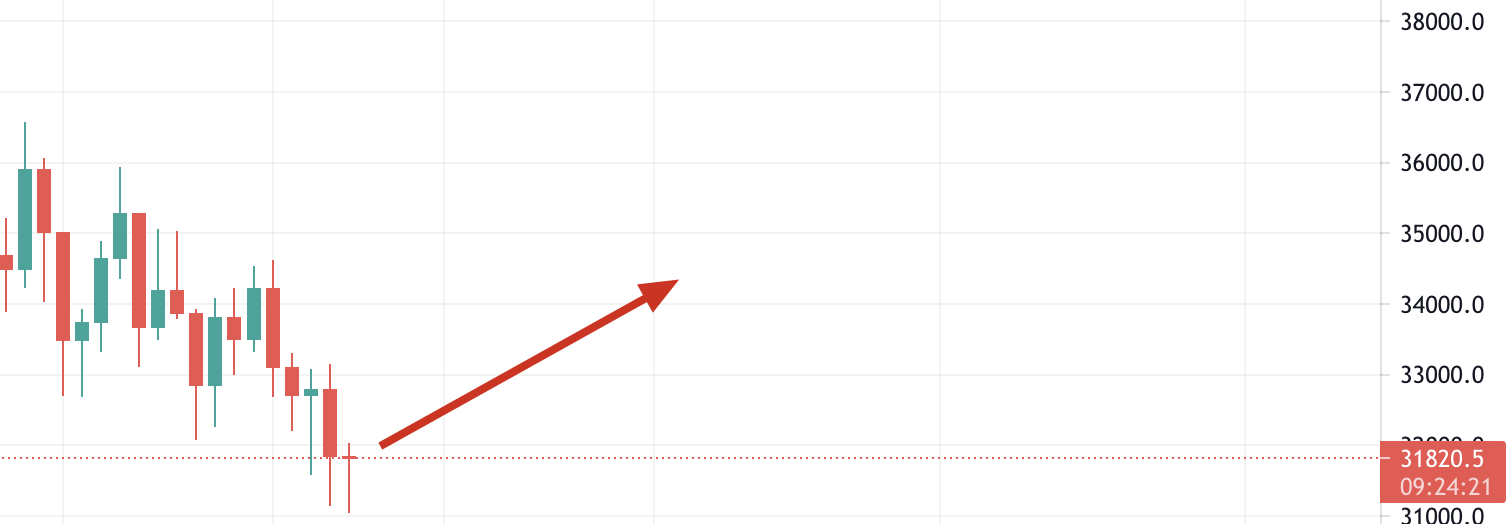
In this case, you can set a Stop-loss sell order to reduce your losses if your guess is wrong and the price starts to fall. To do this, log into your Binance account and navigate to the BTC/BUSD market. Then click on the [Stop-limit] tab and set the stop and limit prices, as well as the amount of BTC to sell.
If you believe that $31,820 is a reliable support level, you can set a Stop-limit order just below this price (in case it does not hold). In this example, we will place a Stop-limit order for 5 BTC with the stop price at $31,790 and the limit price at $31,700. Let's see it step by step.
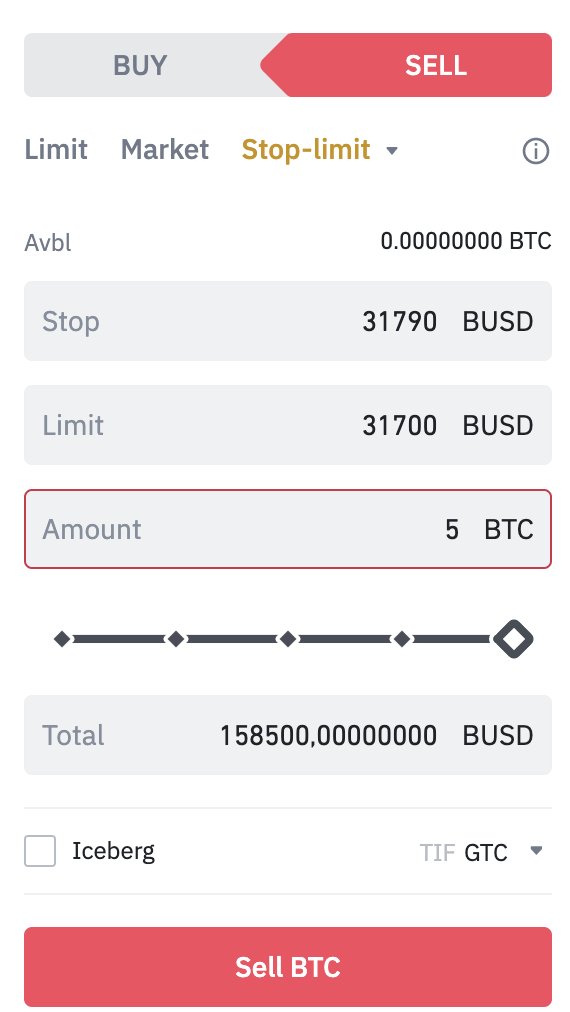
When you click [Sell BTC], a confirmation window appears. Make sure the information entered is correct and tap [Place order] to confirm. After placing your Stop-limit order, you will see a confirmation message. You can also scroll down to view and manage your open orders.

Please note that the Stop-limit order will only be executed if and when the stop price is reached. This means that the Limit order will only be filled if the market price reaches your limit price or higher. If your Limit order is triggered (by the stop price), but the market price does not reach the price you set, the limit order will remain open.
Sometimes you may find yourself in a situation where the price is falling too quickly, and your Stop-limit order is placed without being executed. In this case, you may need to use Market orders to exit the trade quickly.
Advantages of using a Stop-limit order
A Stop-limit order allows you to customize and plan your trades. We can't always track prices, especially in the 24/7 cryptocurrency market. Another advantage of the stop-limit order is that it allows you to set a defined amount of profit to take. With no limit, your order will be executed at whatever market price it is. Some traders prefer to hold their cryptos rather than sell them at all costs.
Disadvantages of using a Stop-limit order
Stop-limit orders have the same disadvantages as Limit orders, mainly because there is no guarantee that they will be executed. A Limit order will only begin to execute when the market reaches the specified price or better. However, this price may never be reached. Even if you can create a gap between your limit and the stop prices, the gap may not be enough. Highly volatile assets may generate a larger price spread than you place in your order.
Liquidity can also be an issue if there are not enough takers to process your order. If you are concerned that your orders will only be partially processed, consider using fill or kill orders. This option specifies that your order should only be executed if it can be executed in its entirety. However, note that the more conditions you add to your order, the less likely it is to be executed.
Strategies for placing stop-limit orders
Now that we've looked at stop-limit orders, what's the best way to use them? Here are some basic trading strategies to increase the effectiveness of your Stop-limit orders and avoid some of their drawbacks.
1. Study the volatility of the asset you are placing a Stop-limit order on. We have already recommended setting a small gap between the Stop order and the Limit order to increase the chances of your Limit order being executed. However, if the asset you are trading is volatile, you may need to increase this spread.
2. Consider the liquidity of the asset you are trading. Stop-limit orders are particularly useful when trading assets with large Bid-Ask spreads or low liquidity (to avoid unfavorable pricing caused by slippage).
3. Use technical analysis to determine price levels. It is a good idea to set your stop price at an asset's support or resistance level. To determine these levels, you can use technical analysis. For example, you can use a stop-limit order with a stop price just above an important resistance level to take advantage of the possible break of the resistance. Or a stop-limit order to sell just below a support level to ensure you exit before the market declines.
If you're unsure about support and resistance levels, check out The Basics of Support and Resistance Levels Explained.

To conclude
A Stop-limit order is a powerful tool that can give you more trading opportunities than simple market orders. It also carries the added benefit of not requiring active trading to execute the order. By combining multiple stop-limit orders, it's easy to manage your holdings whether the price is falling or rising.